Region capture
Drag to select any rectangle of your screen. Snap-to-element for clean edges. Multi-monitor aware. Hotkey is fully remappable.
▸ FRAME 00 A private darkroom for your screen
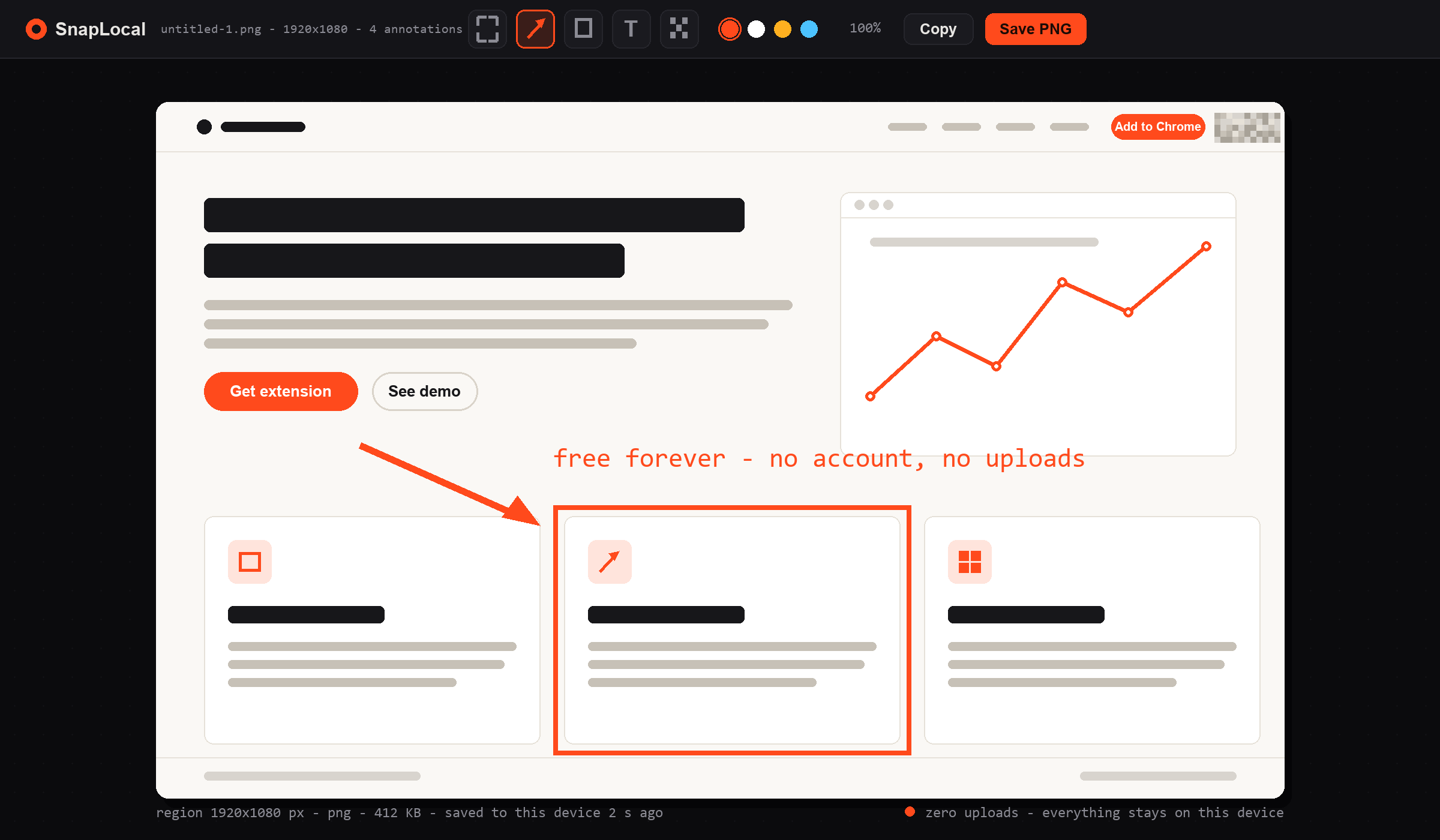
SnapLocal is a Chrome extension for capturing and annotating the web — region shots, arrows, free mosaic, text, brush. Everything is processed on your machine. Nothing is uploaded. Nothing is stored on a server. Nothing is behind a paywall.
fig. 01 — the editor. everything you see here happens on your device.
▸ FRAME 01 The point
Every mainstream screenshot tool trades your privacy, your wallet, or both. We built SnapLocal on the opposite bet: stay local, stay free, stay honest.
Captures are written straight to your local history in IndexedDB. There is no server to leak them, no public URL to enumerate, no third-party CDN with your face on it. Airplane mode works.
privacy by architecture
Arrow, rectangle, ellipse, text, brush, and the pixel-perfect mosaic redactor —
every tool ships in the free tier. Nimbus and FuseBase lock mosaic behind
$60/year. We don't.
Pro is a single $19 payment. No monthly nag, no free-trial-to-credit-card trap, no dark patterns. If we ever ship a big new module, existing Pro users get it included.
pay once, own itHotkey to capture in under 50 ms. No spinner, no "uploading to cloud…", no sign-in wall before you can even take a shot. It's a tool, not a service.
speed as a feature▸ FRAME 02 Why people switch
We built SnapLocal because we got tired of the same three trade-offs. Here's the honest comparison — with sources you can verify.
| Capability | SnapLocal | Lightshot | Nimbus / FuseBase | GoFullPage |
|---|---|---|---|---|
| Screenshots uploaded to a public URL | No100% local | Yesprntscr.com — enumerable | Yescloud-hosted shares | Optionaloff by default |
| Free mosaic / redaction tool | Includedfree forever | Basiclimited editor | Paywalled~$60/yr plan | Paywalledexport gated |
| Free PNG / JPG export | Unlimited | Yes | Limitedwatermark / quota | PaidPro required |
| Account required to capture | Never | No | Yesfor most features | Sometimes |
| Works offline | Fully | Partlyshare needs net | No | Partly |
| Long-standing bugs (e.g. blank captures) | None known | Reported for yearsblank screenshot bug | Occasional | Occasional |
| Price | Free · $19 one-time Pro | Free + paid tiers | ~$60 / year | ~$30 / year |
* Comparison based on public pricing pages and user reports as of Sep 2026. Competitor names and trademarks belong to their respective owners. Verify before switching — see FAQ.
▸ FRAME 03 The toolkit
A tight, opinionated editor. Every tool ships in the free tier — including the one your current extension charges $60 a year for.
Drag to select any rectangle of your screen. Snap-to-element for clean edges. Multi-monitor aware. Hotkey is fully remappable.
Redact emails, IDs, faces, balances — with adjustable brush size and intensity. This is the tool other extensions put behind a paywall. Here, it's just… there. Forever.
no paywallClean vector shapes with adjustable stroke, fill, and shadow. Nudge with arrow keys. Snap to 15° angles with Shift.
Live-editable labels with background plate, outline, or plain. Match the underlying page's font or use one of six bundled stacks.
Pressure-sensitive on supported devices. Perfect for circling, hand-drawn callouts, or quick sketches over a capture.
Every capture is indexed on-device with instant search, tags, and one-click re-edit. Clear it any time with a single button. It's yours.
PNG and JPG are free with zero watermark and zero quota. Copy to clipboard, save to disk, or drag into another app — instantly.
Region, full-page, and last-capture shortcuts you can rebind to anything. Chrome's own shortcut page is respected — no conflicts, no hijacking.
▸ FRAME 04 Pricing
Free is genuinely useful. Pro is a one-time thank-you for people who want the extras and want to keep the project alive. Neither expires. Neither nags.
$0/ forever
for casual captures
no account. no email. no credit card.
$19 $59 / once
launch pricing · ends soon
no subscription. ever. we promise.
NOTE — SnapLocal Free will always be free. Pro exists so we can keep building it without selling your data or your attention.
▸ FRAME 05 The promise
SnapLocal has no server that stores captures. No analytics pipeline that fingerprints them. No public share URLs that can be enumerated by strangers. The extension is architected so that even if we wanted to look — and we don't — there'd be nothing to look at.
This page loads zero external scripts, zero external fonts, and zero analytics. View source — it's short.
▸ FRAME 06 Questions
Yes. Region capture, all annotation tools (arrow, rectangle, ellipse, mosaic, text, brush), local history, and PNG/JPG export are free with no watermark, no quota, and no account required. Pro is a one-time $19 upgrade for full-page capture and power features — it's never required to use the core tool.
In your browser's IndexedDB on your own device, under the
SnapLocal extension origin. They are never sent anywhere. Clear them
any time from the History panel with a single button, or by uninstalling
the extension.
Fully. Capture, annotate, mosaic, export, and browse history all work with zero network access. The only thing that needs internet is installing the extension from the Chrome Web Store and purchasing Pro.
Because subscriptions for a screenshot tool are a racket. Nimbus and FuseBase charge ~$60/year for features (like mosaic) that should be table stakes. We'd rather sell you a great tool once and earn your trust — and your referral.
Lightshot uploads every capture to a public prntscr.com URL
that can be enumerated by crawlers — leaked ID cards, DMs, and internal
dashboards have all been found this way. It also has a well-documented
blank screenshot bug on some sites that has persisted for years.
SnapLocal keeps everything local and doesn't have that bug.
Yes, both Free and Pro include commercial use. Pro is per-user; if you're rolling it out to a team of 10+, email us and we'll do a sensible team price.
No third-party analytics, no ad pixels, no external fonts, no CDN scripts. This page is a single HTML file with local CSS and JS. View source and check the network tab — you'll see almost nothing leave your machine.
30 days, no questions asked. Email hs18103737670@gmail.com with your order ID and we'll refund you in full. You keep any captures you made — obviously.
Any Chromium-based browser: Chrome, Edge, Brave, Opera, Vivaldi, Arc, and Chromium itself. Firefox support is on the roadmap. Safari is not planned (Manifest V3 differences make it a separate rewrite).
No. If we ever ship a genuinely separate product (say, a team workspace), that will be its own thing — but SnapLocal Pro for individuals stays one-time forever. Everyone who buys Pro at any price keeps all future updates included.
▸ FRAME 07 Install
One click. Free forever. No account, no upload, no subscription. If you've ever regretted hitting "share" on Lightshot — this is your replacement.
Available now on the Chrome Web Store